

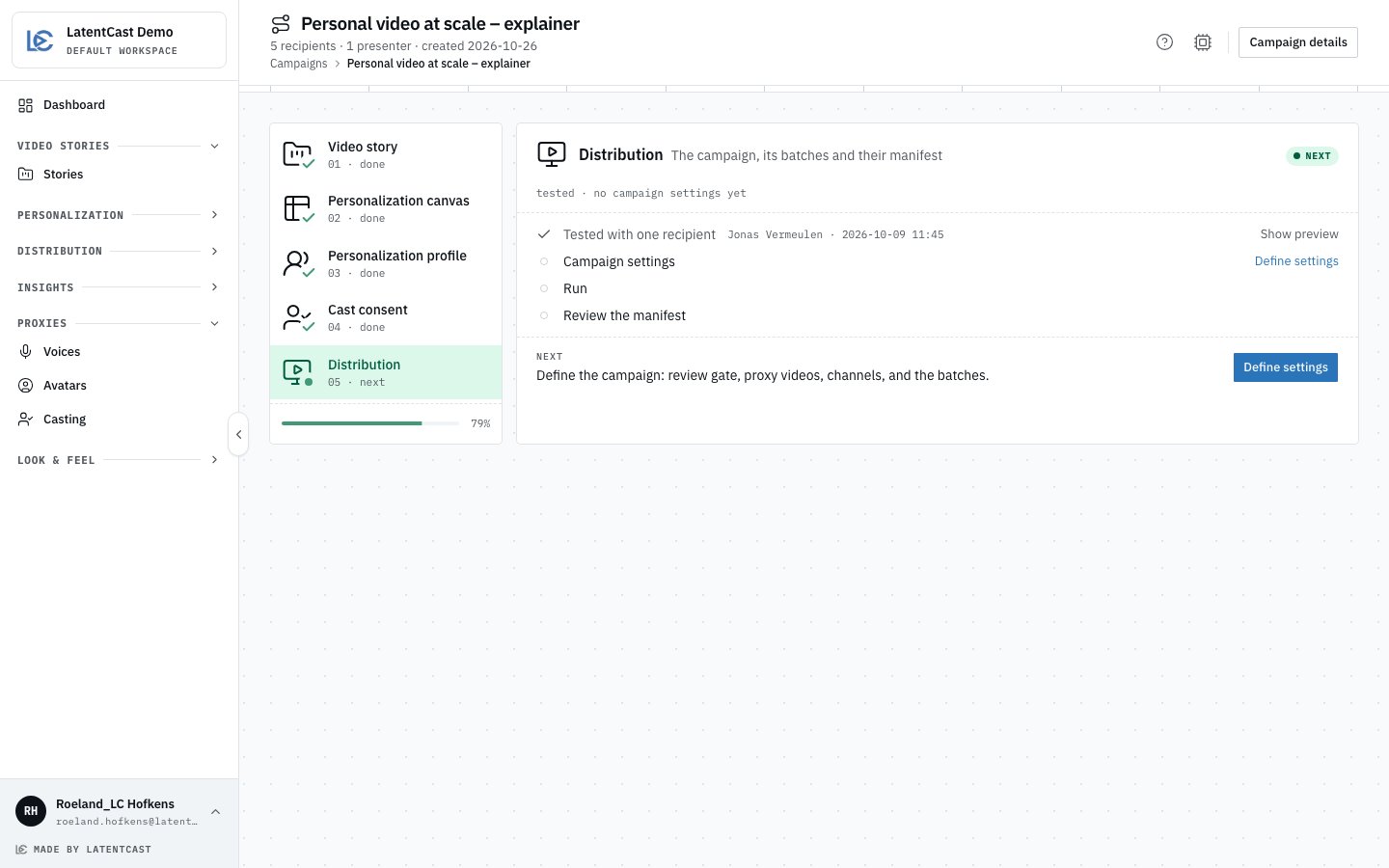
A guide at station 05: four stations done on the rail, and Define settings as the next step.
The five stations
The rail on the left shows each station with its number and where it stands: done, next, or how
many of its steps are done. A station that depends on an earlier one stays locked until that one is
ready, except starting from a profile on station 03. The bar
under the rail shows how far the whole campaign is.
Do
1
Start a campaign
Press New campaign on the Dashboard or on Campaigns, give it a name and press Create.
The guide opens on station 01.
2
Do the next step
The open station lists its steps, each with what is known about it: which story, who consented
and since when. Under the steps, Next names the one thing to do now, with its button:
Choose or create, Open cast, Define settings. Press it.
3
Look without acting
Each step also has a Show … link (Show cast, Show preview, Show batches) that opens
the page behind it, so you can check something without changing it.
4
Come back
A page you open from the guide shows a line under its header with the campaign’s name and
station. Press Back to campaign to return to that station, or ✕ to close the line.
Start from a profile that worked
Ran an outreach that worked? Station 03 is open from the start for this: the new campaign takes that outreach’s profile and story, and its recipients if you want the same people again.1
Pick the profile
On station 03, press Start from a profile, pick a signed-off profile and press Start from
this profile. The campaign takes its story if it has none. With no canvas yet, the sheet asks:
Choose new recipients, or Reuse the profile’s canvas.
2
Finish the story and the canvas
Nothing is copied yet: station 03 shows Starting from and the profile’s name while you finish
stations 01 and 02. Change picks another profile; Clear forgets it and keeps the story and
canvas it filled.
3
Duplicate it
Once both are done, press Duplicate profile. The copy carries every setting over, keeps the
story version that profile ran, takes this campaign’s canvas and name, and is signed off at once.
A campaign that already had another story keeps that story, on its latest version.
An amber flag names each part of the profile this canvas cannot personalize: its column is missing
or switched off, so that part stays as in the story. The flag opens the canvas; it never blocks.
Changing the story or the canvas
Until the campaign settings are saved, and while the profile has produced nothing and nobody in its cast has been invited, stations 01 and 02 offer Change: pick another story or canvas, and the profile moves along with it. Once the campaign has batches, it is locked to its profile, so every video in it is made under the same rules.Campaign details
The batches live on Campaign details: Campaign details in the guide’s header, Show batches on station 05, or the campaign’s menu on Campaigns. It shows the campaign’s settings along the top and one card per batch, where you run, review and mark as sent. Back to campaign returns to the guide. See Campaigns and batches. While a batch is still preparing a presenter’s master, station 05 says so, with about how long that usually takes.When a campaign is finished
A campaign is finished when the manifest of every completed batch has been reviewed. Station 05 then says what is left, which is yours: send the videos from your own tool and mark each batch as sent on Campaign details. Open insights shows how the campaign lands. Campaigns made before the guide existed open as guides too, with the stations they completed done.Campaigns, the overview
Distribution ▸ Campaigns shows every campaign as a card: the story’s picture, the track of five stations, the current station with its next step, and how many batches and viewing pages it produced (pages produced).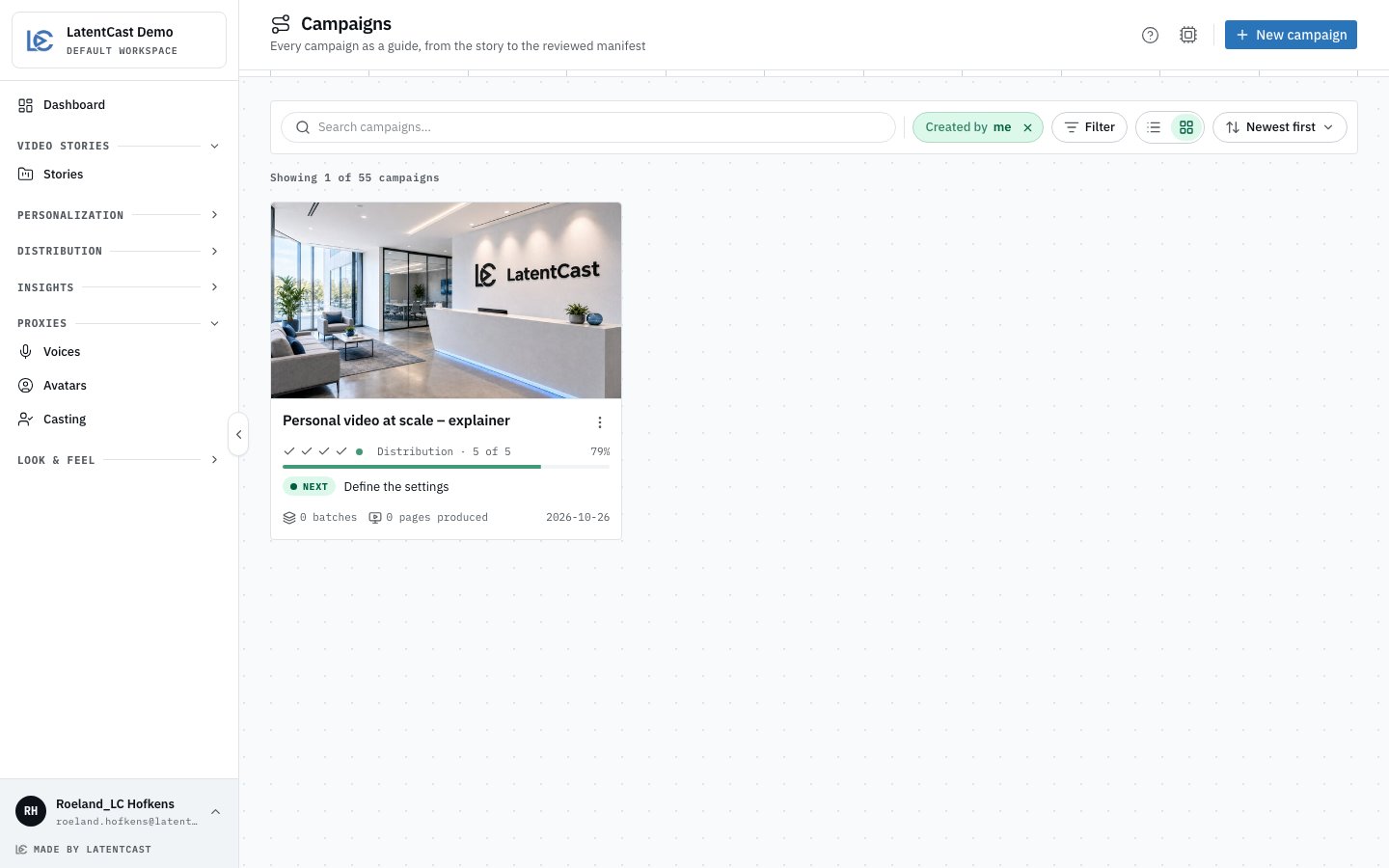
Campaigns, opened on Created by me: one card per campaign with its station track and next step.
- It opens on Created by me. Remove that filter to see your organization’s campaigns; the list remembers your choice.
- Filter ▸ State narrows it to In progress or Finished. Finished campaigns come last.
- The card’s menu holds Campaign details, Settings (once a profile is linked), Insights, Duplicate and Delete.
Next
Your first campaign
The guide station by station, from the first story to the first send.
Campaigns and batches
The campaign settings, and how a batch runs.
The manifest and sending
Review what a batch produced, and send it.