

Do
1
Open Auto batches
On step Batches, press Auto batches. The line under your batches says how many people
are not in a batch yet. When everyone is, the button is off.
2
Choose how to split
Canvas order fills the batches from the first row of your list to the last. Rep gives
each presenter batches of their own, so every batch holds one presenter’s people. Rep is
available when the campaign’s profile personalizes the presenter.
3
Pick a size
Press 10, 25 or 50, or type a size of your own in Custom, up to 50.
4
Name them
Keep the name pattern or press one of the patterns under it (see
Name patterns). To give one batch a name of its own, type over its name in the
preview.
5
Check the preview
Every batch with its number, its rows, its first and last person, and how many people it holds.
Press ✕ to leave a batch out: its people stay without a batch, and the batches after it
renumber. Put back brings them back.
6
Create them
Press the button that counts them, such as Create 2 batches. They are created all at once,
or none are. Nothing runs yet: you start each batch from the campaign when you are ready.
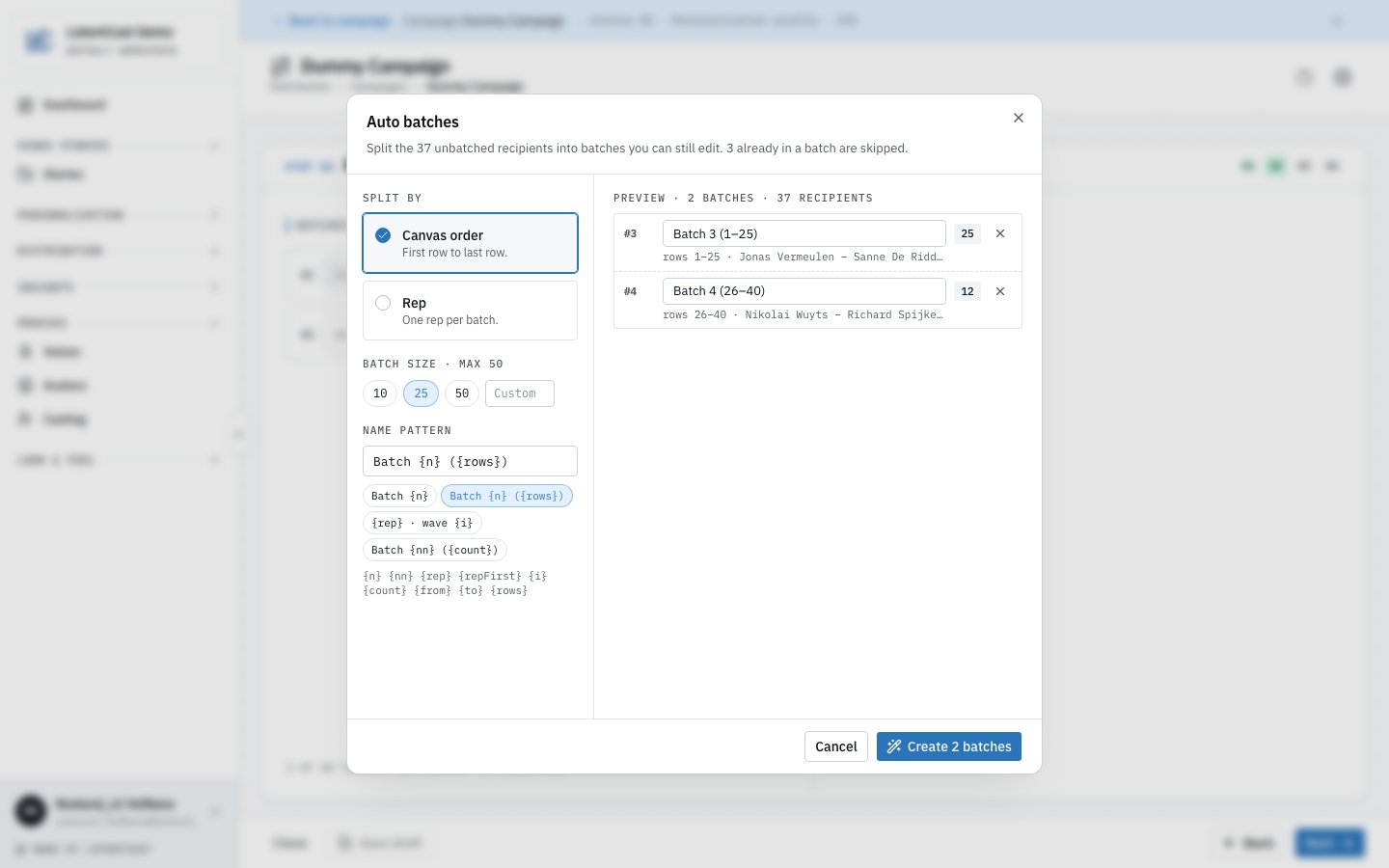
Canvas order at 25 per batch: the 37 people without a batch become batch 3 with 25 people and batch 4 with the 12 left over.
How the split works
- Only people without a batch. Anyone already in a batch of this campaign is skipped, and the dialog says how many.
- Full batches first. Every batch holds the size you chose, except the last one, which takes what is left: 37 people at 25 make a batch of 25 and a batch of 12. With Rep, each presenter’s last batch takes the rest of their people.
- Presenter by presenter. With Rep, presenters come in the order they first appear in your list, and each presenter’s people keep their order.
- People without a presenter. When the profile personalizes the presenter, the dialog warns you about rows with no presenter. With Rep, they are grouped in the last batches, named No rep. Their videos cannot be produced until you fill in their presenter in the canvas.
- Numbers continue. New batches are numbered after the campaign’s existing ones: with two batches already, the first new one is batch 3.
Name patterns
A pattern is text with tokens in curly braces. Every batch fills in its own values, and the preview shows the names as you type.
Canvas order starts with
Batch {n} ({rows}), which gives Batch 3 (1–25). Rep starts with
{rep} · wave {i}, which gives Alex Martin · wave 1.
With Rep, a presenter’s people are rarely next to each other in your list, so a {rows} range
can take in people of other presenters. A token the dialog does not know stays as you typed it, so a
typo shows up in the preview.
Next
Campaigns and batches
How a batch runs, and its controls.
Reviewing before you send
Read every script before anything is rendered.