> ## Documentation Index
> Fetch the complete documentation index at: https://www.latentcast.com/docs/llms.txt
> Use this file to discover all available pages before exploring further.
# Reviewing before you send
> The pause that lets you read every recipient's script before a single video is made — what to look for, and how to fix what you find.
**Where:** the batch card, once a gated batch has paused
Text is cheap and video is expensive. That is the entire argument for the
narrative review gate: it stops a run after the scripts are
written and before anything is rendered, so a wrong claim costs you a correction rather than fifty
finished videos.
Switch it on in the campaign wizard. For a first campaign, and for any campaign to people who
matter, leave it on.
## How it goes
Every person is personalized up to their script, and then the batch parks. It waits indefinitely,
and the card's main action becomes **Review narratives**.
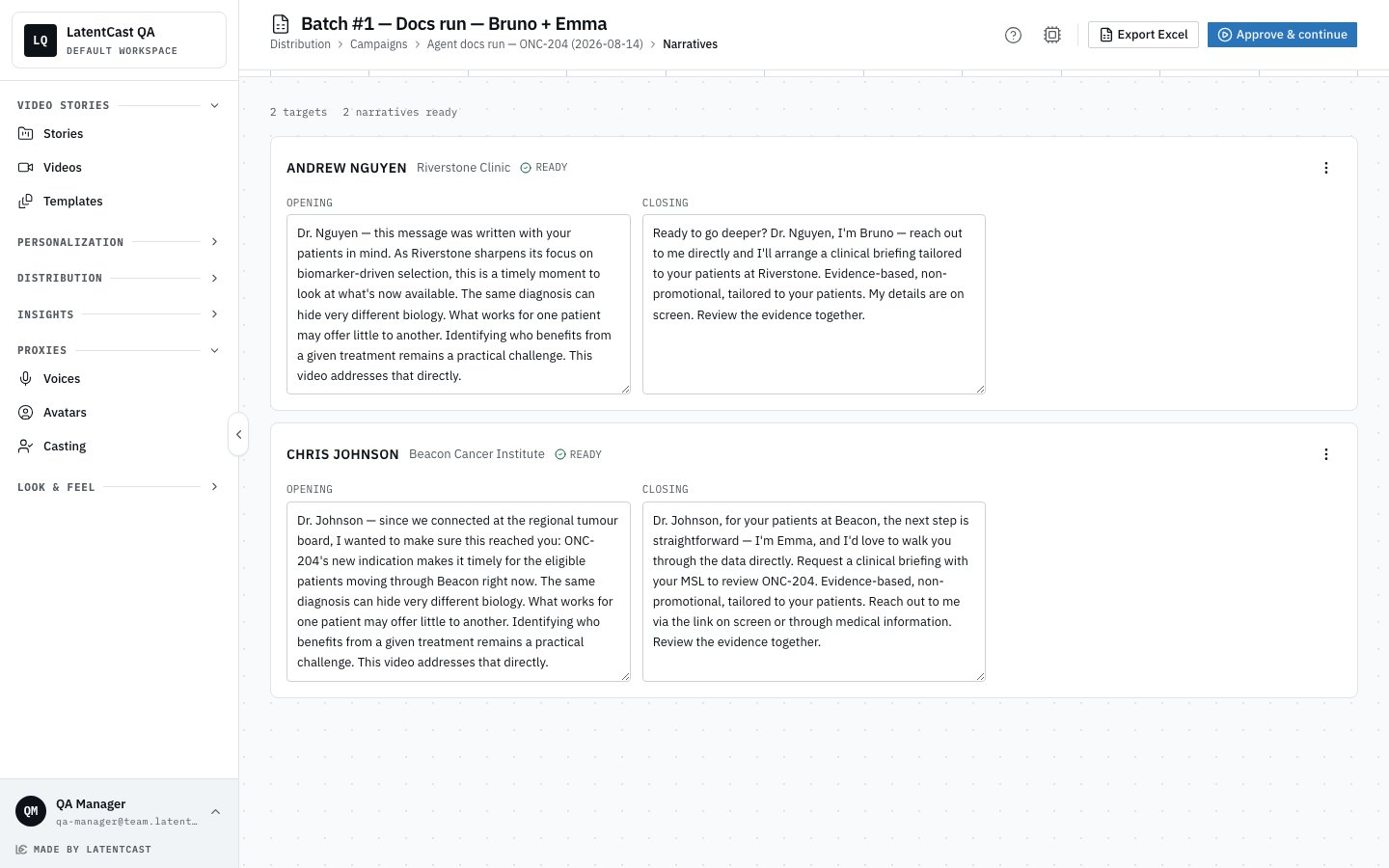
One card per person, with the personal parts in editable boxes: the opening, the optional context
scene, and the closing. The core story between them is signed off and is not editable here, which
is the point.
Type straight into a box and it saves as you go. **Undo** puts back the original wording.
**Regenerate** writes that person's script again when you would rather have a fresh take than
hand-edit. **View target info** shows the data the text was written from, so you can check a claim
against its source without leaving the page.
Releasing the batch lets voicing, animation, rendering and assets run for everybody.
 **What you approve is what gets spoken.** Your edits are voiced exactly as written. The system does
not regenerate the script behind you after you approve.
## Reading a batch of scripts well
Twenty-five scripts is a lot of similar text, and it is easy to skim. Four things repay attention:
* **Anything asserted about the person that you cannot find in their row.** This is the single most
important catch, and this page is the last place to make it cheaply.
* **Sameness.** If every opening has the same shape, the batch will read as automated to anyone who
compares notes with a colleague.
* **Tone against the relationship.** Warm familiarity to a cold contact reads worse than a neutral
greeting.
* **The thin rows.** Someone with sparse data gets a shorter, plainer opening. Check that it still
stands on its own rather than sounding truncated.
## Reviewing outside the product
**Export Excel** downloads this batch's scripts, for a review pass with someone who is not a
LatentCast user. Edits still have to be made in the product before you approve.
## Afterwards
The review page stays available after approval as a read-only record of what was said to whom, which
is useful when someone asks months later.
## Next
What a finished batch hands you.
The run itself, and its controls.
**What you approve is what gets spoken.** Your edits are voiced exactly as written. The system does
not regenerate the script behind you after you approve.
## Reading a batch of scripts well
Twenty-five scripts is a lot of similar text, and it is easy to skim. Four things repay attention:
* **Anything asserted about the person that you cannot find in their row.** This is the single most
important catch, and this page is the last place to make it cheaply.
* **Sameness.** If every opening has the same shape, the batch will read as automated to anyone who
compares notes with a colleague.
* **Tone against the relationship.** Warm familiarity to a cold contact reads worse than a neutral
greeting.
* **The thin rows.** Someone with sparse data gets a shorter, plainer opening. Check that it still
stands on its own rather than sounding truncated.
## Reviewing outside the product
**Export Excel** downloads this batch's scripts, for a review pass with someone who is not a
LatentCast user. Edits still have to be made in the product before you approve.
## Afterwards
The review page stays available after approval as a read-only record of what was said to whom, which
is useful when someone asks months later.
## Next
What a finished batch hands you.
The run itself, and its controls.