> ## Documentation Index
> Fetch the complete documentation index at: https://www.latentcast.com/docs/llms.txt
> Use this file to discover all available pages before exploring further.
# Campaigns and batches
> Produce your whole list in groups you control: the campaign wizard, how a batch runs, and what to do when one stalls.
**Where:** Distribution ▸ Campaigns, then **New campaign**
A campaign takes one proven profile and produces it for everybody. It is
locked to that profile for its whole life, which is what makes a campaign something you can reason
about: every video in it was made under the same rules.
## Setting one up
Choose the profile, then decide how far a run goes on its own. Every run always personalizes;
these three switches decide what follows.
| Switch | On means |
| ------------------------- | -------------------------------------------------------------------- |
| **Proxy videos** | Scenes that changed for a recipient get their presenter animated |
| **Publish** | Each finished story is rendered and published automatically |
| **Narrative review gate** | Every run pauses after the scripts are written, so you can read them |
For a first campaign, switch the review gate on.
Pick people from your list into one or more batches. This step also holds the
frame anchor: the moment your preview images and animations start
from. Leave it unset and the system picks a window around the personal moments.
Tick the channels you will send on, such as email, LinkedIn or WhatsApp. This writes the matching
outreach copy for each recipient. It does not send anything.
Name the campaign and check the summary. Saving activates it and locks the profile.
## Batches, and why they are small
A batch is a group of people produced together. It references rows in your
list rather than copying them, so your list stays the single source of truth.
**A batch holds up to 25 recipients.** That is a deliberate limit, not a performance ceiling: it
keeps any single mistake small and reviewable. Split a larger list across several batches and run
the first one before you commit to the rest.
When you pick people, two guards run:
* **Duplicates** inside your selection are collapsed.
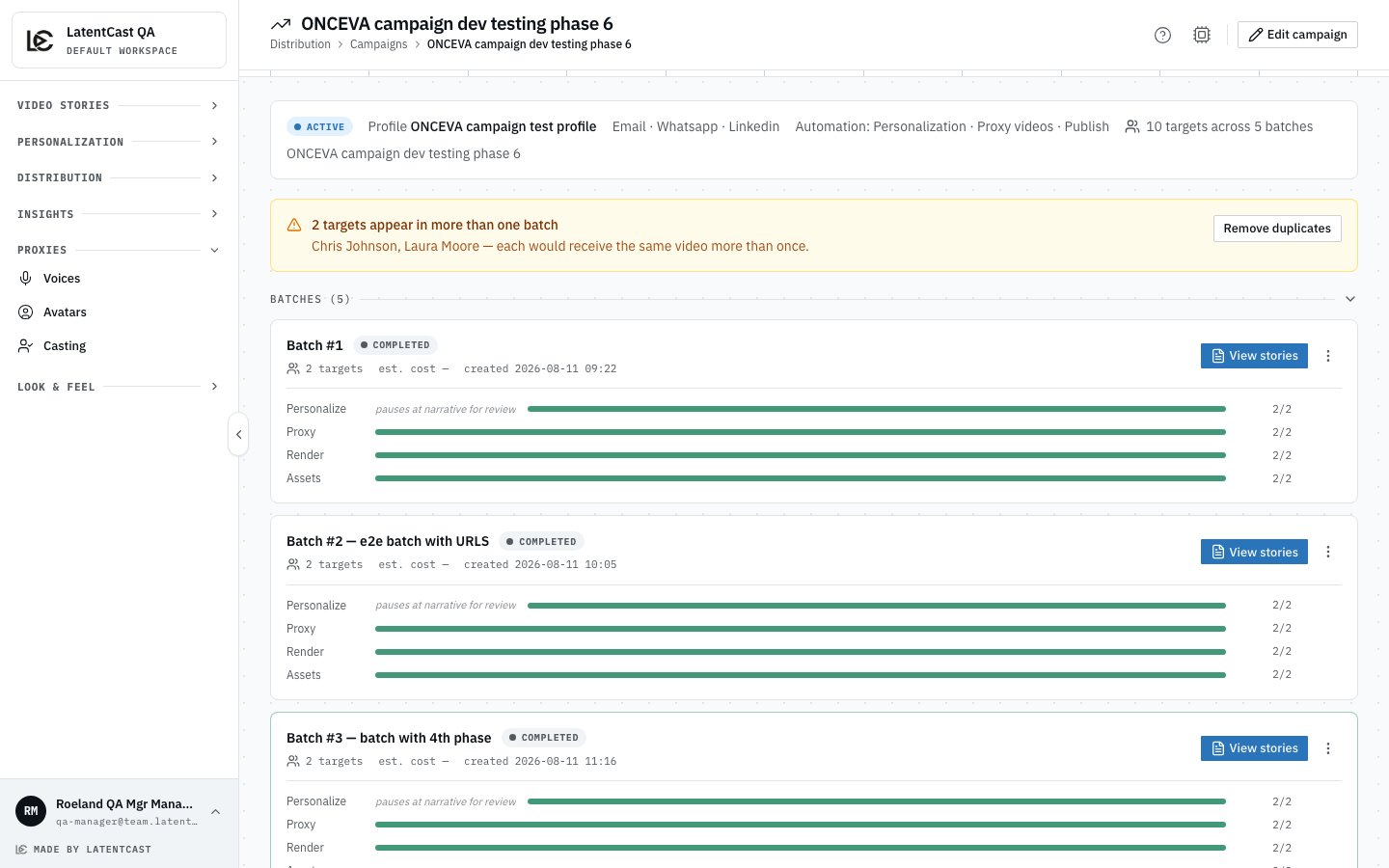
* **Overlap warnings** appear when someone is already in another batch of this campaign, or another
campaign on the same profile. Overlap is allowed, since re-running someone can be intentional, but
it should never happen by accident. Each membership produces and costs separately.
Your selection is kept as you search, so you can assemble a mixed batch across several searches, and
a separate tab shows who is already in the batch you are editing.
**Blocking** a person keeps them in the batch but skips them in every run until you unblock them.
Use it for the row with a data problem you have not fixed yet.
## Running a batch
Press **Run**. Every person moves through up to four phases, and the batch
card shows one progress bar for each.
| Phase | What happens |
| --------------- | ------------------------------------------------- |
| **Personalize** | Each person's story is written and produced |
| **Proxy** | The presenter is animated for scenes that changed |
| **Render** | Each story becomes a real video and is published |
| **Assets** | Preview images and outreach copy are built |
**A batch is only complete when the last preview image is built, not the last video.** Ready means
sendable. Hold your send until the whole card is green.
A pulsing bar is working now. Phases your campaign did not switch on say so instead of showing a
bar, and the batch comes to rest when it reaches one. Carry it forward by hand from the batch's menu
with **Generate proxies** or **Publish**.
Runs are throttled on purpose: a batch feeds the pipeline steadily rather than all at once, so
expect even progress rather than everything finishing together.
 ## Controls
| Action | What it does |
| ---------------- | ----------------------------------------------------------------------------------------------------- |
| **Pause** | Stops new work starting. Anything in flight finishes cleanly, and resuming picks up where it stopped. |
| **Stop** | Cancels the batch's open work. Finished work is kept. |
| **Retry failed** | Re-runs only the people who failed, from the phase they failed in. |
## When a batch will not start
The most common reason is consent. A batch whose presenters have not all consented tells you so
before it runs: it names each presenter who is blocking, counts the recipients affected, and offers
a direct route to the cast to chase them. Re-check once they have acted.
## Reading a failure
Failure is a visible state rather than a mystery. The batch card counts failures per phase and shows
the most recent reason. Inside the batch, each failed person carries their own reason.
"Waiting for presenter master" is not a failure. Each presenter's shared scenes are produced once
and then reused for all of their recipients, so the first person of a presenter takes longer and the
rest are quick. That is the system saving you time and money.
## Next
Read every script before anything is rendered.
Collect the results and get them into your sending tool.
## Controls
| Action | What it does |
| ---------------- | ----------------------------------------------------------------------------------------------------- |
| **Pause** | Stops new work starting. Anything in flight finishes cleanly, and resuming picks up where it stopped. |
| **Stop** | Cancels the batch's open work. Finished work is kept. |
| **Retry failed** | Re-runs only the people who failed, from the phase they failed in. |
## When a batch will not start
The most common reason is consent. A batch whose presenters have not all consented tells you so
before it runs: it names each presenter who is blocking, counts the recipients affected, and offers
a direct route to the cast to chase them. Re-check once they have acted.
## Reading a failure
Failure is a visible state rather than a mystery. The batch card counts failures per phase and shows
the most recent reason. Inside the batch, each failed person carries their own reason.
"Waiting for presenter master" is not a failure. Each presenter's shared scenes are produced once
and then reused for all of their recipients, so the first person of a presenter takes longer and the
rest are quick. That is the system saving you time and money.
## Next
Read every script before anything is rendered.
Collect the results and get them into your sending tool.